A few weeks ago in Berlin, our four-year old Bea was biking home from a yummy Pelmeni dinner in the neighborhood. We tried to follow the “good” bike routes on Google Maps and ended up on a major road with just a painted bike lane and no clear, safe way home. This problem kept happening, day after day while navigating the city with Bea.
In the past, I would have hoped for Google Maps to make it better some day. But now, as the cost of building software has gone down with LLMs, I decided to try to fix the problem. With about 4 days (32 hours) of hands-on time over a few weeks, I got to a point where I have a decent prototype for finding where the good bike routes are.
If you bike with a kid, go check out the prototype here and let me know what you think!
Key Need: A Faster Way to Learn About Bike Corridors for Kids
When we lived in Berlin in 2019, all the mapping tools also sucked. We had to learn where to bike the hard way — by riding streets and remembering which bike corridors we liked.
This is the best way to find personalized, secret shortcuts…but it takes forever 🙂
Fast forward to today — our bike corridor memories are still there but fuzzy. Plus Berlin built a ton of new bike infrastructure that we had only heard anecdotes about. Plus our biking needs have also changed with a 4 year old turtle hatchling!
Berlin’s Improving Bike Network
The city’s bike network improved during the pandemic — there are many more new bike corridors that vary from good to great in quality.
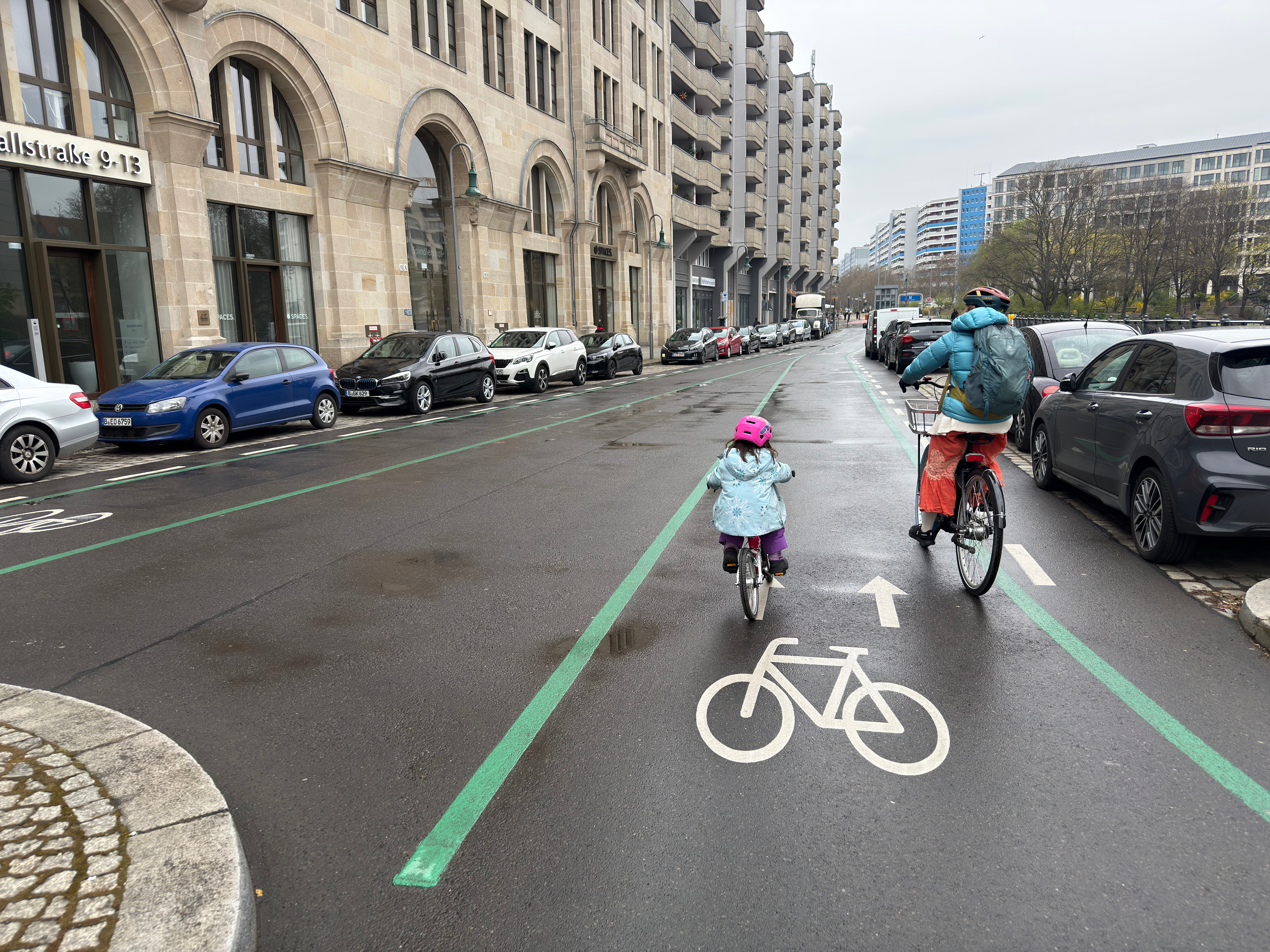
New Fahrradstraßen spread everywhere. On these streets, bikes have priority over cars (cars must wait behind you), with car barriers every few intersections to encourage car through-traffic to go somewhere else.
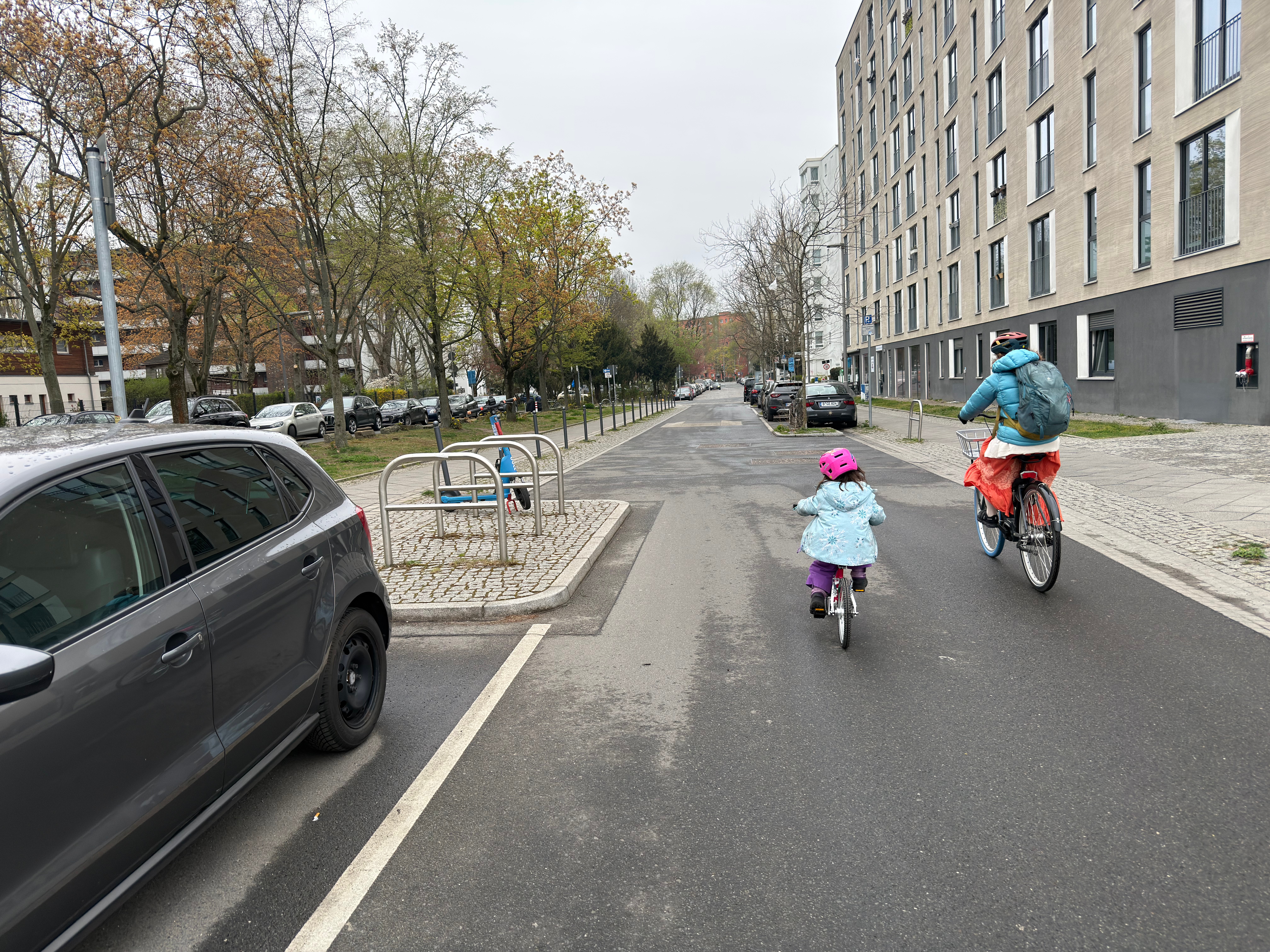
There were also many new “living streets” marked for kids to play on and for bike use that had traffic calming measures like bulb outs and speed bumps to slow down cars. On many major corridors, they also took out one lane of car traffic to make a wider, better-separated painted bike lane.
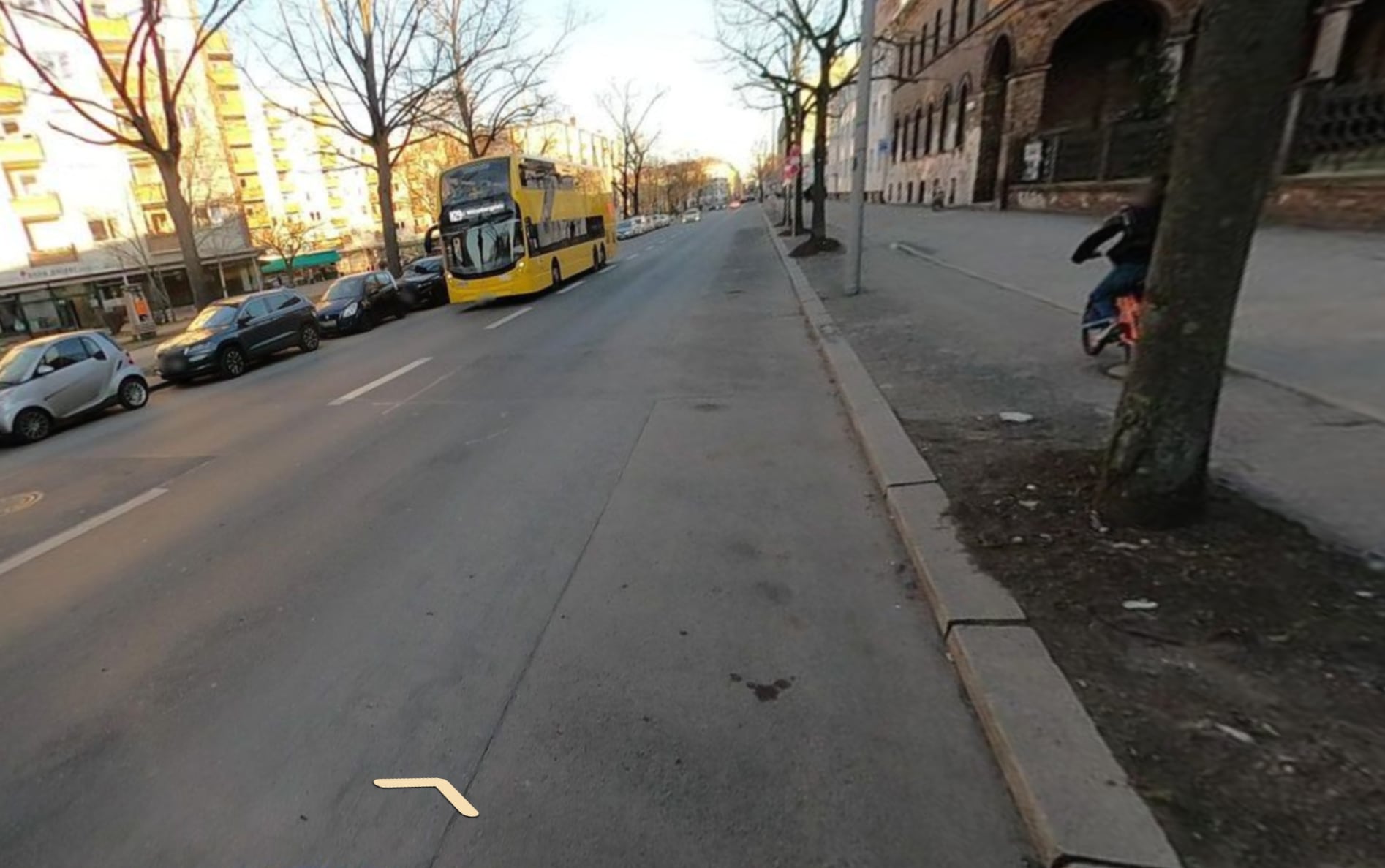
Meanwhile, the elevated sidewalk bike paths had six more years to decay — narrower than we remembered, and bumpier in a way that really matters when you’re towing a trailer with a four-year-old in it.
Our Changing Needs as A Family
Bike infrastructure is not the only thing that’s changed. This time, we have a toddler, and so we needed to find new ways to bike around the city.
A few weeks before leaving for Berlin, Joanna and I were biking in San Francisco when she put it this way — we choose to take on extra risk because the benefits of biking make it worth it. Biking gives us independence, connection with people nearby, exercise, and no smelly emissions!
So the main thing we need help with is to find paths that bring us joy AND that have acceptable risk given Bea’s current biking ability.
For me, “acceptable” keeps shifting as Bea grows. Mainly I want to only have to think about helping her manage a risky interaction (e.g. at an intersection) once every few minutes.
To explain what “acceptable” means in a mapping app, I needed something more concrete! So I started from the “Level of Traffic Stress” (LTS) framework from Mekuria, Furth, and Nixon (2012) to try and categorize how much stress comes from each “type” of bike path (e.g. a multi-use recreational trail vs. a busy road).
LTS didn’t feel granular enough for kids, so I split up LTS 1 and LTS 2 into two subcategories to better fit the progression I saw with Bea:
| Stress Level | What it is | Examples |
|---|---|---|
| LTS 1a | Car-free path | Bike paths, separated cycleways, shared foot paths |
| LTS 1b | Bikeway with minimal car traffic (e.g. bike priority, barriers to through traffic, traffic calmed) | Fahrradstraßen, living streets, SF Slow Streets, Portland greenways |
| LTS 2a | Bike path (e.g. painted lane) beside slow cars on quiet residential streets | Painted bike lane on a ≤30 km/h street |
| LTS 2b | Quiet residential, no bike infra. | Side streets with low traffic but no designated bike space |
| LTS 3 | Mixed with traffic | Busy residentials, painted lane on 40–50 km/h roads |
| LTS 4 | Fast arterial | Primary or secondary roads at 50+ km/h without separation |
And this is how these categories map to how we bike with Bea:
| Travel Mode | Rider Ability & How We Bike | What Stress is OK? |
|---|---|---|
| Kid starting out Bea in January 2025 | Can ride bike/scoot/balance bike at slow speed, but still learning control. Stops at intersections. Parent usually walking beside. Bea can bike car-free paths at about 3 mph. Or walk on sidewalk at 1 mph. | LTS 1a only Okay to pause at intersection every few minutes to help. Not okay to have any interactions with cars otherwise. |
| Kid confident Bea in Summer 2025 | Has good control — usually stays in lane under parental command. Parent can bike with kid. Bea can bike on car-free paths or bikeways with minimal car traffic at about 6 mph. Or walk on sidewalk at 2 mph. | LTS 1a + 1b only Intersections are okay, and infrequent, slow-moving cars okay — might need help if veering into lane. |
| Kid traffic-savvy Bea is working on this… | Reads traffic, handles intersections and signals. Bea can bike on all of the routes above, plus painted bike lanes on quieter streets at around 10 mph. May also use other quiet neighborhood streets if needed, but at a lower priority. | Prioritize LTS 1a, 1b, 2a. LTS 2b OK. Separate slow moving cars nearby are okay (e.g. under 25 mph or 30 km/h). |
| Carrying kid | Adult pilots; kid is passenger in seat, trailer, or cargo. Bike with a trailer or child seat, but may walk short segments on the sidewalk for brief LTS 3 sections. | LTS 1-2 OK A majority of biking adults consider these levels acceptable. Less than 10% are okay with LTS 3, so these are excluded. |
Existing Apps Don’t Work Well…
Google Maps
Google Maps didn’t work well in Berlin for kids.
Google’s best category of bike infrastructure, “dedicated lanes”, includes everything from car-free LTS 1a pathways to painted LTS 2b or LTS 3. This makes it hard to tell on both the map and when getting directions what level of risk is at play.
The map is also missing many Fahrradstraßen in Berlin, which are kid friendly (LTS 1b) and have minimal car traffic.
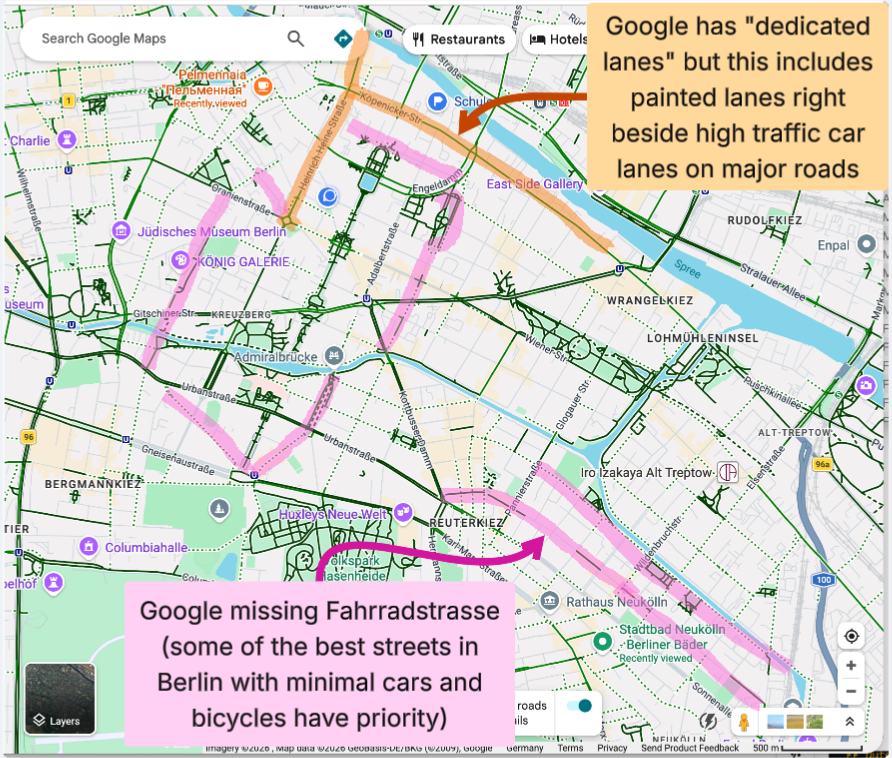
These two issues made Google hard to use with Bea — on most trips when I just followed Google’s top route, I’d get stuck on unacceptable bike paths — only to discover afterwards that a block or two away, there had been a more delightful, low risk alternative.
Other Tools
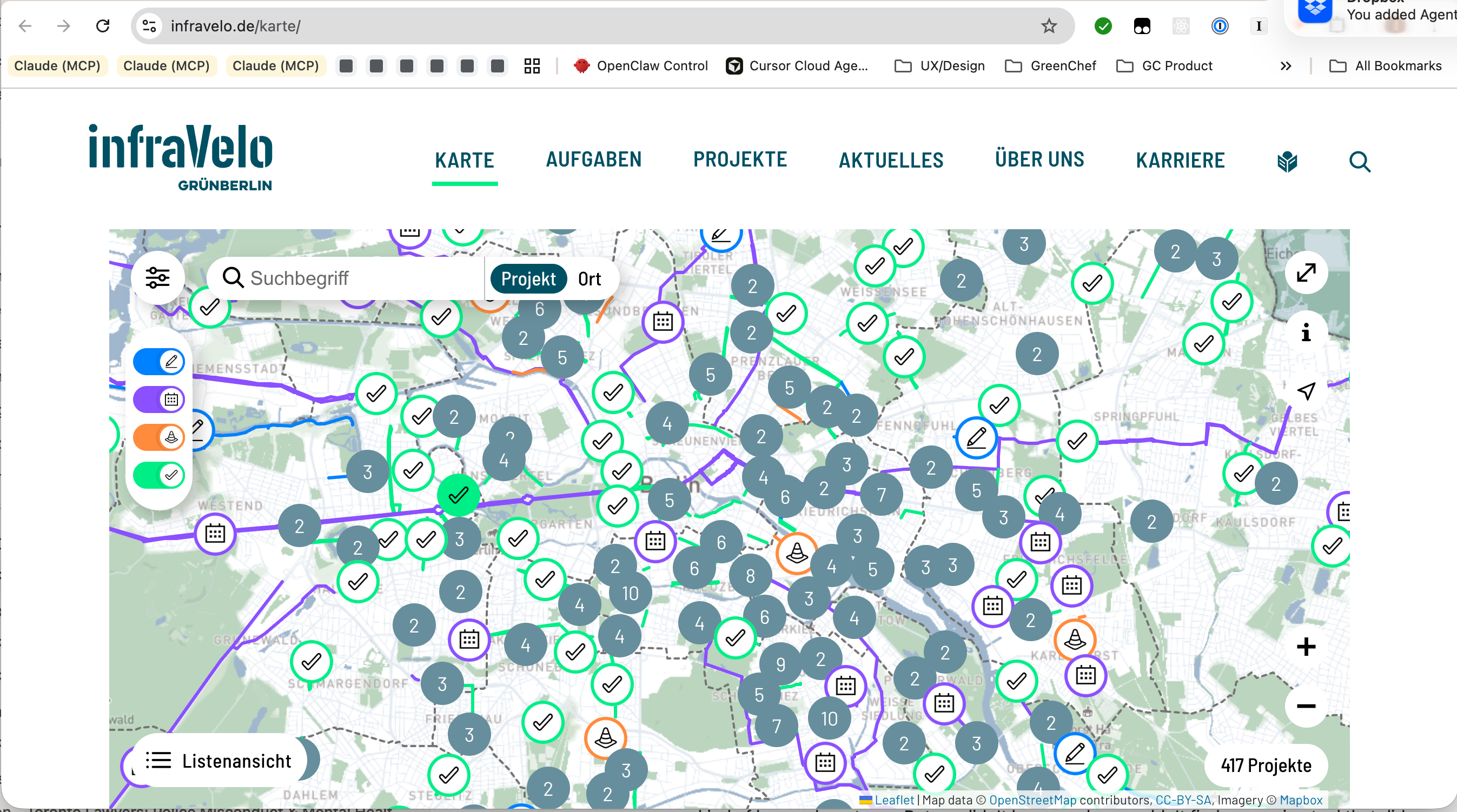
Other tools like Cyclosm and Infravelo, have good up to date data on bike infrastructure, road surface quality, and road types and speeds that matches reality; however, these tools don’t make the data usable.
BRouter is built on the same up to date OpenStreetMap data, but it has only one “Safety” routing profile that cannot be used as a layer for discovery. And the safety routing profile doesn’t match what I need for my family.
Building My Own Map!
After not finding good solutions, I tried to build my own, with the help of Claude.
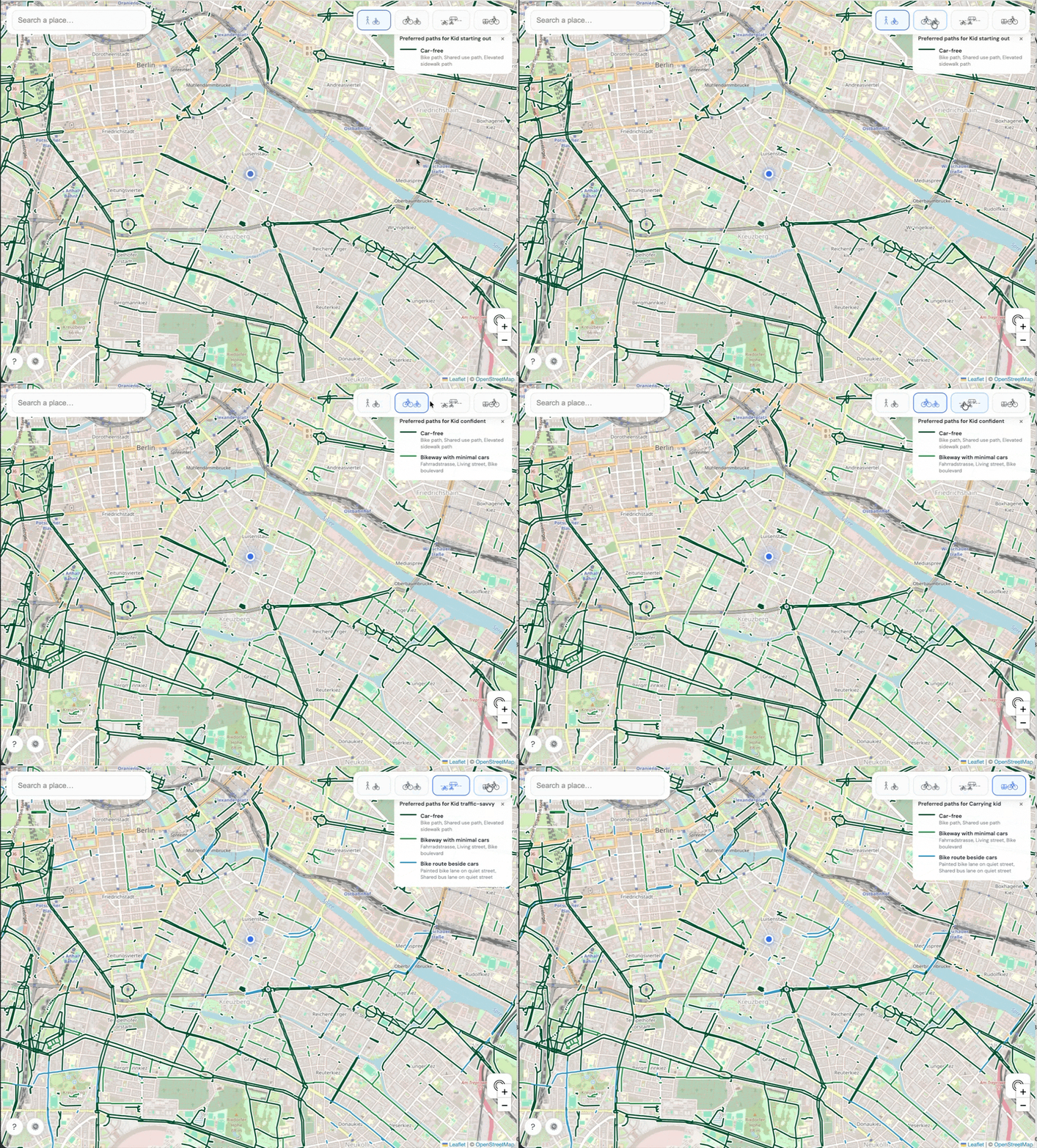
I started with the existing OpenStreetMap data for bike and road infrastructure, which is high quality in Berlin (and many other cities). Added in Mapillary for street view, so you can see photos of what the bike infrastructure looks like in each street.
On top of that, I added in more granular travel modes above and started building my own flow to do multimodal (bike + walk) directions using the travel modes.
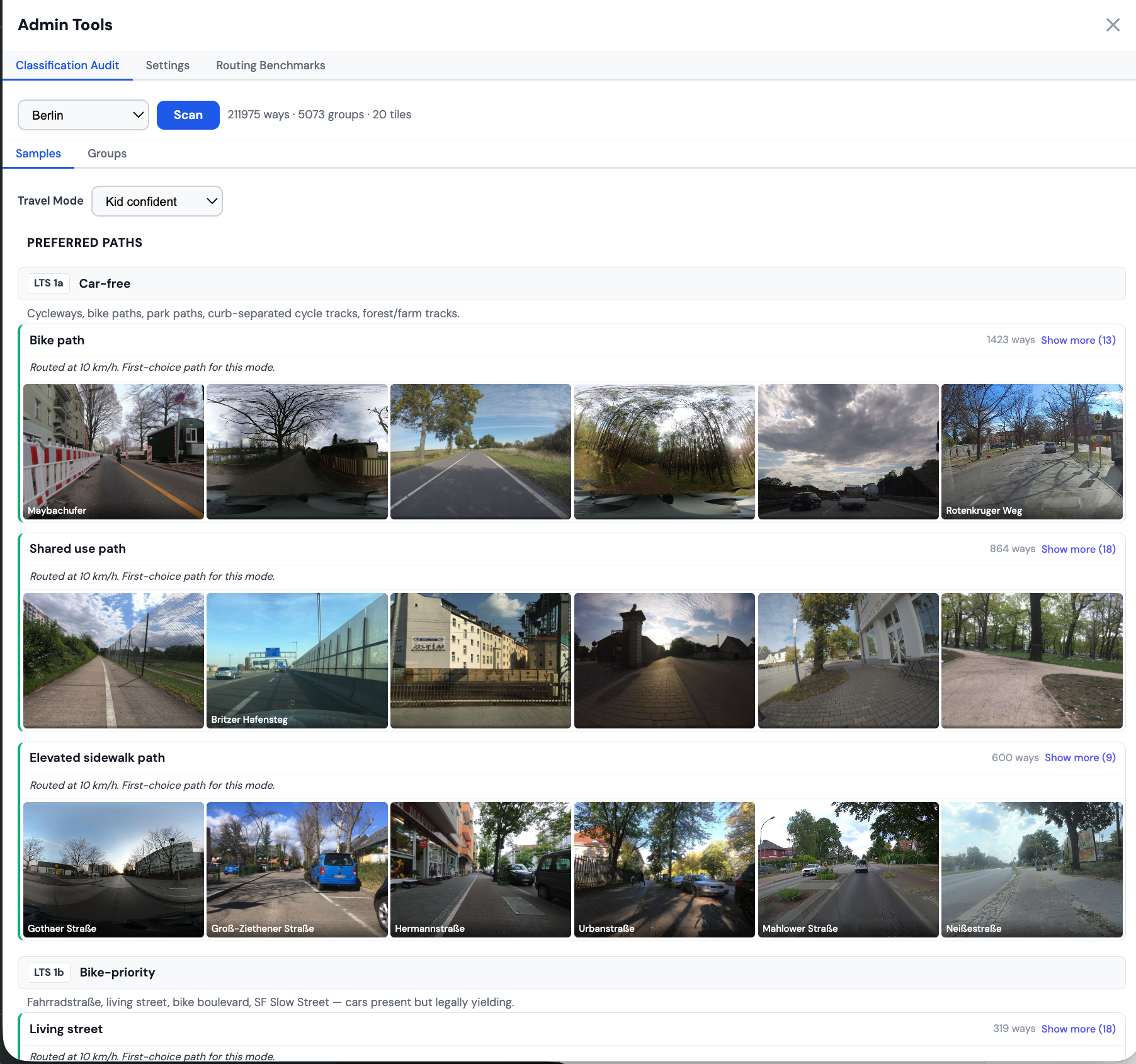
Along the way, I also built out an admin tool to help review the path classification results using street-level photos:
On Getting Directions
Getting directions turned out to be a challenge! A Claude agent team helped me review popular routing engines on top of OpenStreetMap (OSM) data, and no engine could plan multi-modal biking and walking trips for our travel modes using the path categories above.
So for now, I asked Claude to build a custom router that runs in the browser (i.e. client-side). For short trips (under 10 miles) this has been fast enough for the prototype.
How Good Are the Directions? A Work In Progress…
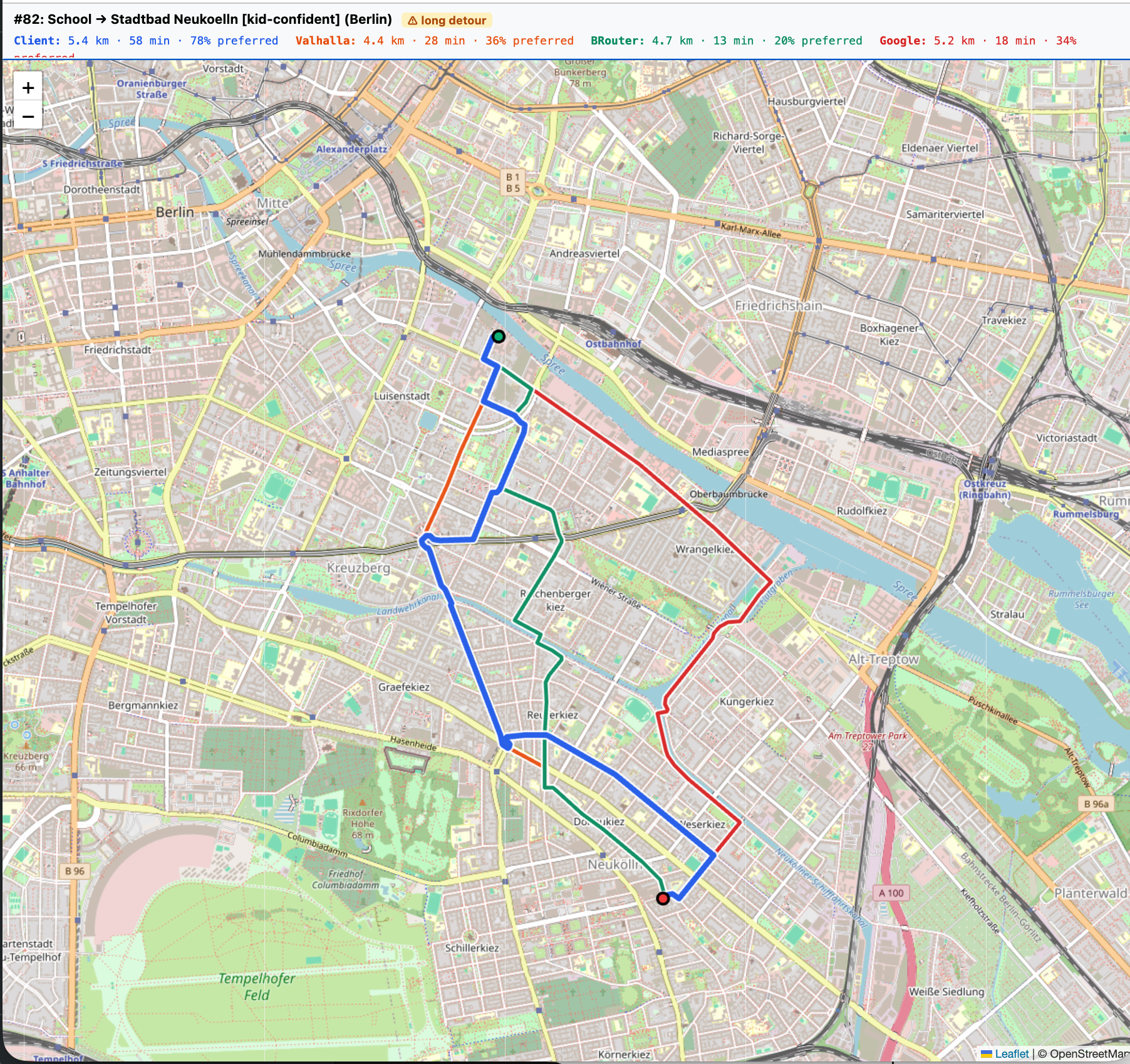
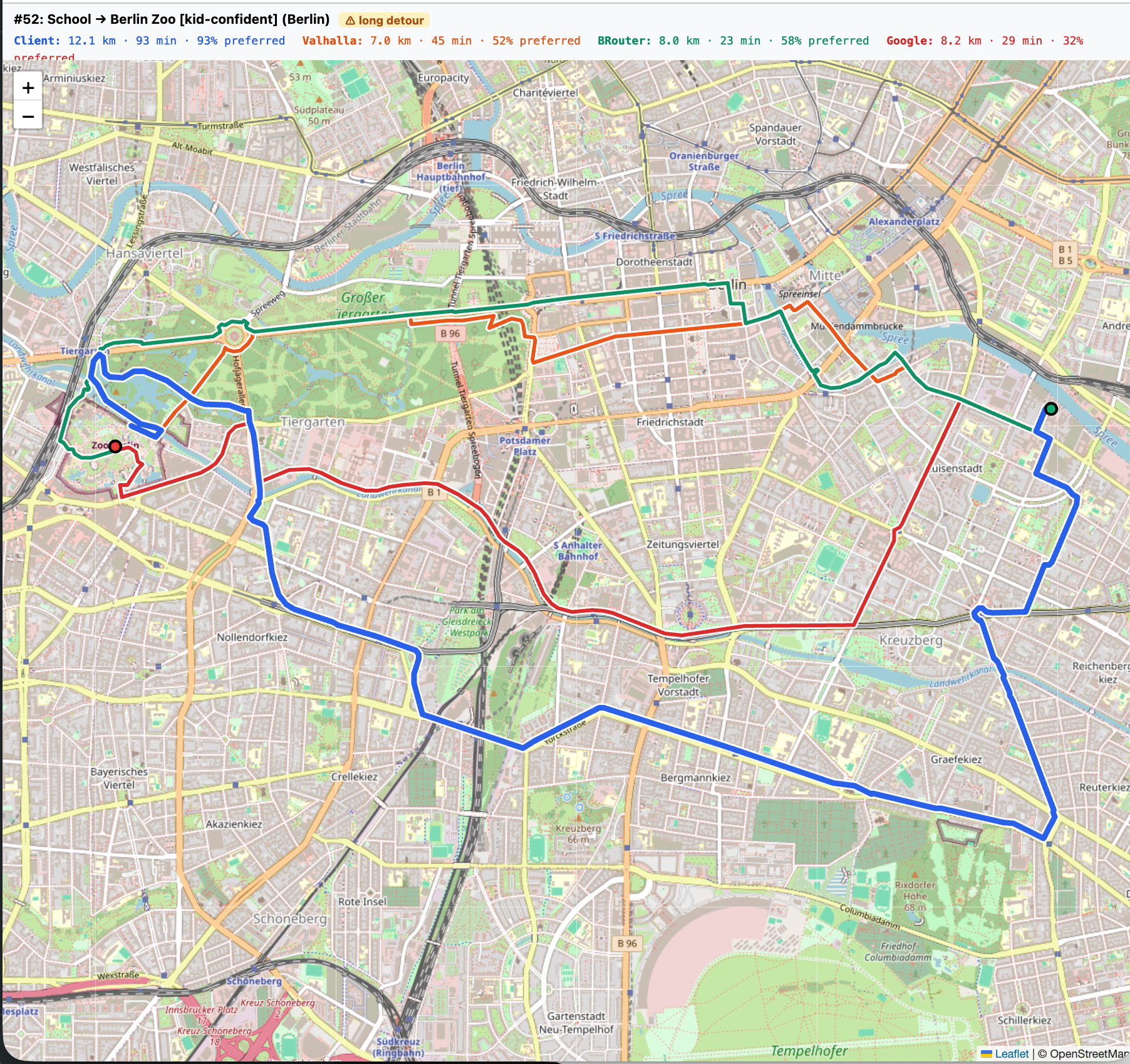
I measured quality vs. bike directions vs. three other routing engines:
- Google Cloud Directions API with
mode=bicycling - Valhalla (a popular OSM router used by projects like Mapbox)
- BRouter (a cycling/hiking focused OSM router)
See the github repo for the full details.
This is a work in progress, but the gist so far is that the custom router in the prototype finds routes that use preferred paths more often (typically ~20% more), but as a tradeoff trips go roughly 30% farther on average (and sometimes over 2×, up to 2.6× in the worst cases). I need to do some more work to avoid unnecessary detours.
![swap in WordPress: `bike-map-preferred-berlin.png`]** — % preferred paths in Berlin, by router × travel mode (post-fix benchmark, 22 origin-destination pairs)](https://octoturtle.net/wp-content/uploads/2026/04/bike-map-preferred-berlin-3.png)
![swap in WordPress: `bike-map-distance_km-berlin.png`]** — Avg route distance in Berlin (km), by router × travel mode](https://octoturtle.net/wp-content/uploads/2026/04/bike-map-distance_km-berlin-2.png)
It’s Getting Cheaper to Build Software for Niche Audiences
32 hours of hands-on work with Claude fixed a problem that I would have just lived with.
I’ve worked on many web applications and data science projects over my two decade career, so I had some past experience to draw on. Without that experience, it would likely be harder for someone else to get to a working map in a few days.
However, the tools are getting rapidly better! Over time, many programmers and non-programmers alike will be able to solve a problem like this with a few hours or days of work.
What problems do you want to go solve?
Try the Map and Share Feedback!
If you ride with kids (or want lower stress bike routes yourself), please give the map a try:
bike-map.fryanpan.com
Feel free to check out the code here:
github.com/fryanpan/family-bike-map
Help make it better (or fork it and use it as inspiration to make your own!)
I’d love to hear your feedback! Please email me at fryanpan@gmail.com or leave feedback on the prototype website!


Leave a comment